




| This page contains a detailed explanation of how to use the igGameCenter. Please contact me if you have any questions not covered here. |
| The 1st step: getting a igGameCenter Account | |
| There are two registration options: a fast and a certified one. The fast sign up process does not check an identity of a new member in depth. The only information required to enter is a desired nickname and a password. The certified sign up process requires entering the correct e-mail and checks its validity. It means that the identity of the member who passed the certified sign up process is checked more thoroughly. The certified members have a special certification sign in their public profile. It is up to you what option to choose. But keep in mind that there are people who will reject playing with non-certified members. For getting the account, click My profile button on the igGameCenter gadget.
If you want to procede with the fast registration then just enter the desired nickname and a password and click Sign Up button. If you want to procede with the certified registration then click the corresponding link below the Sign Up button and you will be redirected to the certified registration form. The only required information you have to enter is your nickname and e-mail. It is vital to provide a correct e-mail because the initial password will be sent to it. Without providing a correct e-mail, you will not receive the initial password and will not be able to login to the igGameCenter and play the games. Besides the required fields, it is up to you what information to provide. But keep in mind that all additional information provided by you is publicly available and could be accessed by everyone. The igGameCenter is not responsible for any inconvenience that could be caused to you by a third party as a result of accessing the information in your public profile. After a successful completion of the sign up process, you will receive an e-mail with your initial password. You will also get a page with a confirmation of all the information provided by you and Click here to Login button at the bottom of the page. Click the button for logging in to the igGameCenter.  |
| The 2nd step: logging in to the igGameCenter for the first time | |
Enter the e-mail provided during the registration process and the received password in the opened window. If everything goes well, you will be redirected to your profile.
You will be able to change your initial password or update the profile information from your profile page. After updating, you can close the profile window. |
| The 3rd step: selecting a game, joining some board or opening a new one |
At the top of the igGameCenter gadget there is a drop-down list that contains a list of all available games. You can choose any game there and see a list of all currently opened boards in the selected game: 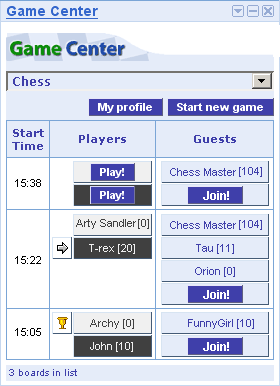 You can click the Start new game button to open a new board. Alternatively, you can click a Join button next to any board in the list to join the corresponding game as a guest or click a Play to join the game as a player on a corresponding place. |
| The 4th step: playing or watching the game |
When you start a new game or join an existing one, a new window is opened that looks like following: 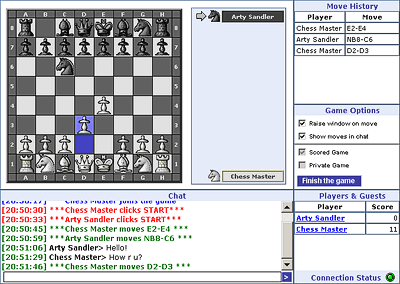 Below is a brief description of the screenshot:
|